
AdsCrawl vs axiom.ai vs Playwright: Which Tool Wins?
Compare AdsCrawl, axiom.ai, and Playwright for browser automation, scraping, testing, and AI agents. See which API, no-code bot, or framework fits your workflow.
AdsCrawl vs axiom.ai vs Playwright: Which Browser Automation Tool Fits Your Workflow?
Browser automation means different things to different teams. A QA engineer wants reliable cross-browser tests. An operations manager wants a no-code bot that fills out forms and updates Google Sheets. A developer building AI agents wants a clean API that returns structured HTML and Markdown without managing browser infrastructure.
AdsCrawl, axiom.ai, and Playwright each target one of these audiences. Choosing the wrong tool leads to frustrated developers, brittle workflows, or unexpected infrastructure costs. This comparison breaks down what each tool actually does, where it excels, and how to match your use case to the right solution.
What Each Tool Actually Is
Playwright product interface.
Before comparing features, it helps to clarify what these three products are—and what they are not.
AdsCrawl: Browser Automation and Data Extraction API
AdsCrawl is a browser automation and data extraction API platform. It provides real browser capabilities through a unified API, letting developers capture screenshots, extract HTML and Markdown, and control remote Chrome DevTools Protocol (CDP) sessions. It is built for AI agents, monitoring, SEO, and automation workflows.
The platform offers cloud browser sessions with fingerprint profiles, concurrent browser execution, and credit-based usage with a freemium model. Teams use AdsCrawl to collect public web pages at scale, validate page rendering states, and wrap repeatable web actions into reliable APIs. Dashboards for key management, usage tracking, and debugging make it easy to integrate via cURL, Node.js, and Python examples.
For a deeper look at how AdsCrawl performs in real-world scenarios, see this hands-on AdsCrawl review.
axiom.ai: No-Code and Code-Based Browser Automation
axiom.ai is a versatile browser automation platform that empowers users to build bots for web tasks without coding, with code, or by describing requirements to Claude. It serves over 300,000 users, from non-technical professionals to developers, enabling them to automate repetitive browser work.
Core use cases include web scraping, filling and submitting forms, extracting data into Google Sheets, integrating with apps like Zapier and ChatGPT, and handling complex workflows with loops, conditional logic, and AI. The platform offers a no-code Chrome Extension with a visual step builder, a code-based environment with an SDK for custom scripts, and an AI-driven mode that generates automations from natural language.
Bots can run on axiom's cloud infrastructure or locally on the user's machine. Key features include a rich library of prebuilt steps, CAPTCHA solving, webhooks, custom JavaScript execution, and deep integrations with services like Google Sheets, Microsoft Excel, Make, n8n, and various AI models including Claude, Gemini, and DeepSeek.
Playwright: Open-Source End-to-End Testing Framework
Playwright is a comprehensive end-to-end testing framework developed by Microsoft, designed for modern web apps. It serves developers and QA engineers who need reliable, fast, and cross-browser testing across Chromium, Firefox, and WebKit.
Core use cases include automated testing, web scraping, and AI agent browser control. Key features include auto-waiting and web-first assertions that eliminate flaky tests, test isolation with fresh browser contexts per test, resilient locators such as getByRole and getByLabel, and built-in parallelism and sharding for CI. Playwright also offers a CLI for token-efficient AI agent integration, an MCP server for AI tools like VS Code and Claude Desktop, and accessibility snapshots for deterministic agent interactions.
Architecture: API-First vs. Visual Builder vs. Library
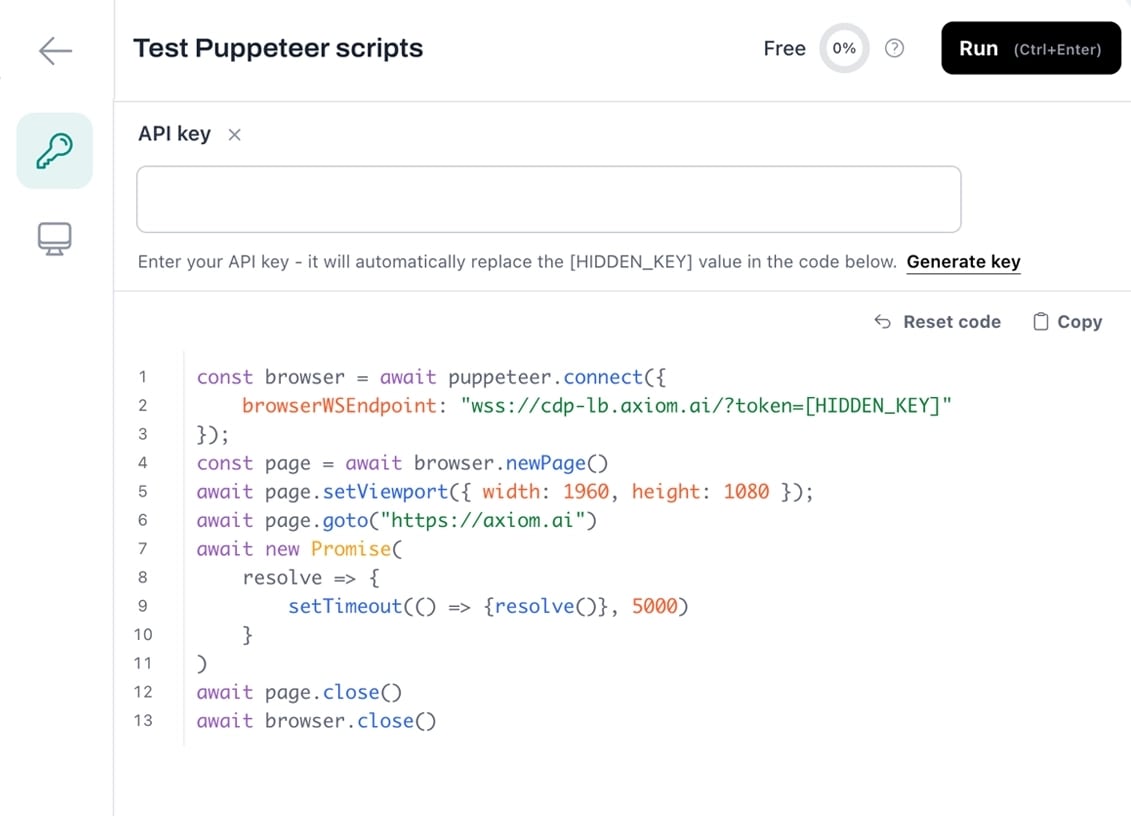
run coded automations in axiom code - axiom.ai.
The fundamental difference between these tools is where the browser runs and who manages it.
AdsCrawl: Unified API with Cloud Browser Sessions
AdsCrawl abstracts browser management behind a clean API. You send a request with a URL and parameters, and AdsCrawl launches a real browser session in the cloud, executes your instructions, and returns structured data. There is no need to install browsers, manage Docker containers, or worry about memory limits on your own machine.
This architecture is especially valuable for teams that need browser capabilities inside serverless functions, AI agent pipelines, or lightweight backend services where running a full browser locally is impractical. The credit-based freemium model means you can start small and scale without provisioning infrastructure.
axiom.ai: Visual Step Builder or Code Environment
axiom.ai takes a different architectural approach. Instead of exposing a raw API, it provides a visual interface where users assemble automation steps like building blocks. The Chrome Extension records and executes actions directly in your browser, while the cloud infrastructure handles scheduled runs and concurrent bot execution.
For developers who prefer code, axiom.ai offers an SDK that allows custom JavaScript execution within bots. The AI-driven mode generates automations from natural language descriptions, making it accessible to users who have never written a line of code. This architecture prioritizes accessibility over raw programmatic control.
Playwright: Self-Managed Library
Playwright is a library you install through npm, pip, or another package manager. It downloads browser binaries and runs them on your own infrastructure—your laptop, CI runner, or cloud VM. You are responsible for configuring resources, managing concurrency, and keeping browsers updated.
This gives you complete control and no per-request billing beyond your own compute costs, but it also means you carry the operational complexity. Playwright's built-in parallelism and sharding help with CI scaling, but you still need to manage the underlying machines.
Developer Experience and Learning Curve
Playwright product interface.
Getting Started
AdsCrawl prioritizes integration speed. Documentation provides cURL, Node.js, and Python examples, so you can make your first API call within minutes. The dashboard offers key management, usage tracking, and debugging tools, reducing the time spent figuring out why a request failed.
axiom.ai offers perhaps the gentlest onboarding of the three. Non-technical users can install the Chrome Extension and start building bots with the visual step builder immediately. The AI mode lowers the barrier further: describe what you want to automate, and the platform generates a bot for you.
Playwright has excellent documentation and a relatively smooth learning curve for developers familiar with async/await patterns. Auto-waiting eliminates many common sources of test flakiness, and the codegen tool can record interactions to generate scripts. However, beginners may need time to understand browser contexts, locator strategies, and CI integration concepts.
Debugging and Observability
AdsCrawl's dashboard provides centralized visibility into requests, responses, and usage. This helps teams monitor automation workflows without building their own observability stack.
axiom.ai provides visual feedback through its step builder, showing exactly which step failed and why. For non-technical users, this visual debugging is more approachable than reading stack traces.
Playwright offers excellent local debugging tools, including Playwright Inspector, trace viewer, and video recording. In production, however, you need to set up your own logging and monitoring infrastructure.
Scaling and Infrastructure Considerations
Handling Concurrent Sessions
AdsCrawl natively supports concurrent browser execution. The platform manages session isolation and resource allocation, so you can run multiple browser sessions in parallel without worrying about memory contention or port conflicts.
axiom.ai runs bots on its cloud infrastructure, handling concurrency and scheduling for you. The platform reports over 800,000 bots executed and 12.5 million hours of runtime, indicating mature infrastructure for parallel bot execution.
Playwright can scale, but you own the infrastructure. Built-in parallelism and sharding work well for CI pipelines, but running hundreds of concurrent browser instances requires significant compute resources—each instance can consume 200-500MB of memory. Teams typically pair Playwright with container orchestration platforms or cloud services to manage at scale.
Anti-Detection and Stealth
AdsCrawl provides fingerprint profiles in its cloud browser sessions, helping automation blend with regular traffic patterns. This matters for data collection workflows where websites may block obvious bot traffic.
axiom.ai includes CAPTCHA solving as a built-in feature, which is valuable for form-filling and data extraction workflows that encounter human verification challenges.
Playwright does not include anti-detection features by default, though you can configure it to appear more human-like. The framework's focus is testing your own applications, where stealth is usually not a concern. For scraping public websites, you would need to add proxy rotation, fingerprint randomization, and other techniques yourself.
AI Agent Integration
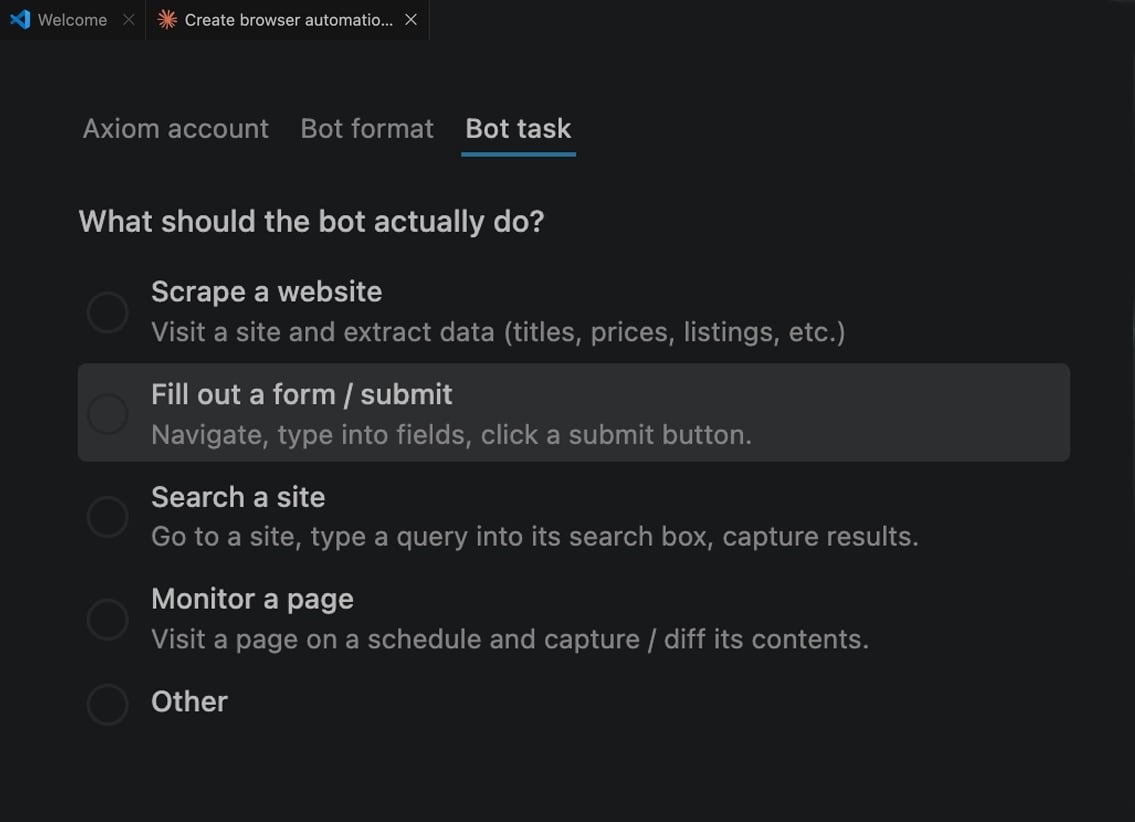
Create and runs browser automations in axiom using claude code.
All three tools position themselves for the growing AI agent market, but their approaches differ significantly.
AdsCrawl treats AI agents as a primary use case. Its API returns structured HTML and Markdown that LLMs can consume directly, and its CDP control allows agents to interact with pages programmatically. The platform's design philosophy treats browser infrastructure as a utility for the AI era.
axiom.ai integrates with AI models like Claude, Gemini, and DeepSeek, and its AI-driven mode generates automations from natural language descriptions. This makes it a practical choice for teams that want AI assistance in building automations, rather than building AI agents themselves.
Playwright provides a CLI designed for token-efficient AI agent integration, an MCP server for tools like VS Code and Claude Desktop, and accessibility snapshots that give agents a deterministic view of page structure. Microsoft's investment in this area signals that Playwright will continue evolving as a bridge between browsers and AI systems.
Pricing and Total Cost of Ownership
Free and Entry-Level Options
AdsCrawl uses a credit-based freemium model, letting you start without upfront cost and scale as usage grows. This appeals to teams that want to validate a use case before committing to a paid plan.
axiom.ai offers a free tier with limited bot runs, suitable for evaluating the platform and automating simple personal workflows. Paid plans unlock more runs, cloud scheduling, and advanced features.
Playwright is completely free and open source. There are no usage limits or per-request billing. However, you pay for the infrastructure it runs on—CI minutes, cloud VMs, or local servers—plus the engineering time to maintain it.
Cost at Scale
For high-volume production workloads, the cost equation shifts. Managed platforms like AdsCrawl and axiom.ai charge by usage, which can become expensive at very high volumes but eliminates infrastructure management costs. Self-hosted Playwright has lower marginal cost per request but requires substantial investment in infrastructure, monitoring, and maintenance engineering.
The right choice depends on your team composition. If you have dedicated DevOps resources and predictable workloads, self-hosting Playwright may be more economical. If you want to minimize operational overhead and scale elastically, managed platforms typically deliver better total cost of ownership.
Use Case Mapping: Which Tool Fits Your Workflow?
Choose AdsCrawl When:
- You need a unified API that returns structured data—HTML, Markdown, screenshots—without writing browser automation code.
- You are building AI agent pipelines that need to consume web content in LLM-friendly formats.
- You want cloud browser sessions with fingerprint profiles and concurrent execution without managing infrastructure.
- Your team prefers credit-based pricing with a freemium entry point and a monitoring dashboard.
Choose axiom.ai When:
- You or your team members are non-technical and need to automate browser tasks without writing code.
- Your workflows involve filling forms, extracting data into Google Sheets, or integrating with tools like Zapier, Make, or n8n.
- You want AI-assisted automation building through natural language descriptions.
- You need CAPTCHA solving and prebuilt steps for common web interactions.
Choose Playwright When:
- You are building end-to-end test suites for your web application.
- You need cross-browser testing across Chromium, Firefox, and WebKit.
- You have the infrastructure expertise to manage browser instances at scale.
- You want complete control over your automation stack with no vendor dependency.
- Your team values open-source transparency and community-driven development.
Comparison Table
| Criteria | AdsCrawl | axiom.ai | Playwright |
|---|---|---|---|
| Type | Browser automation API platform | No-code/code browser automation platform | Open-source testing framework |
| Browser management | Fully managed cloud browsers | Cloud or local bot execution | Self-managed |
| Primary use cases | AI agents, data extraction, monitoring, SEO | Web scraping, form filling, data to Google Sheets, integrations | End-to-end testing, web scraping, AI agent control |
| Protocol support | Unified API, CDP | Visual step builder, SDK, AI generation | Native Playwright API, MCP server |
| Anti-detection | Fingerprint profiles | CAPTCHA solving | Manual configuration required |
| Scaling model | Concurrent cloud sessions, credit-based | Cloud bot execution, scheduling | Self-managed parallelism and sharding |
| Pricing | Credit-based freemium | Free tier, paid plans | Free and open source |
| AI agent features | Structured HTML/Markdown output, CDP control | AI-generated automations, AI model integrations | CLI for AI agents, MCP server, accessibility snapshots |
| Languages | cURL, Node.js, Python | No-code, JavaScript SDK | Node.js, Python, Java, .NET |
Practical Examples
Example 1: Monitoring Competitor Pricing
A growth team wants to track competitor pricing daily and feed the data into an internal dashboard.
AdsCrawl approach: Write a script that calls the AdsCrawl API for each competitor URL, requesting HTML and Markdown output. Schedule the script with a cron job or serverless function. The dashboard shows usage and debugging information.
axiom.ai approach: Build a bot in the Chrome Extension that navigates to competitor pages, extracts price data, and writes it to Google Sheets. Schedule the bot to run daily on axiom's cloud infrastructure.
Playwright approach: Write a Playwright script that launches a browser, visits each URL, extracts prices using resilient locators, and saves results to a database. Deploy the script to a CI runner or cloud VM with a scheduler.
Example 2: Building an AI Agent That Researches Web Pages
A developer is building an AI agent that needs to fetch web pages and extract clean content for LLM processing.
AdsCrawl approach: Call the AdsCrawl API with a URL, receive structured Markdown in the response, and pass it directly to the LLM. The CDP control allows the agent to interact with pages when needed.
axiom.ai approach: Use axiom.ai to build scraping bots that feed data into a pipeline, then connect that pipeline to an AI model through integrations. This works well when the scraping workflow is stable and the AI processing happens downstream.
Playwright approach: Use the Playwright CLI or MCP server to give the AI agent browser control. Accessibility snapshots provide a deterministic view of page structure that reduces token consumption.
Example 3: Testing a Web Application Across Browsers
A QA team needs to verify that a new feature works across Chromium, Firefox, and WebKit before release.
Playwright approach: Write test suites using Playwright's cross-browser support, web-first assertions, and test isolation. Run tests in CI with parallelism and sharding for fast feedback.
AdsCrawl approach: Not designed for testing your own application. Its focus is data extraction and browser automation for external web pages.
axiom.ai approach: Not designed for application testing. Its focus is automating repetitive browser tasks for business workflows.
Related reading
- AdsCrawl vs Scrapfly vs ScrapingBee: Which API Wins? - Compare AdsCrawl, Scrapfly, and ScrapingBee for browser automation, scraping, and screenshots. See which API fits your AI agents and data workflows.
- ChatGPT Review 2026: 3 Years of Daily Use, Pros, Cons & Privacy - Evidence-based ChatGPT review after 3 years of daily use. Covers GPT-5.2 features, real-world performance, pricing, privacy risks, and ideal use cases.
Sources and further reading
- Notes on browser automation, collection engineering, and AI workflows - The blog shares product practice, technical breakdowns, and field notes for teams building data workflows with real browsers.
- ChatGPT Review 2026: 3 Years of Daily Use, Pros, Cons & Privacy - Evidence-based ChatGPT review after 3 years of daily use. Covers GPT-5.2 features, real-world performance, pricing, privacy risks, and ideal use cases.
Frequently Asked Questions
Can I use Playwright with axiom.ai or AdsCrawl?
Playwright is a standalone library and does not integrate directly with axiom.ai. AdsCrawl provides CDP control, which means you can interact with its cloud browser sessions programmatically, but it is not a drop-in Playwright replacement. Each tool serves a different layer of the browser automation stack.
Is AdsCrawl a replacement for Playwright?
Not exactly. AdsCrawl is an API platform that provides browser capabilities without requiring you to write Playwright or Puppeteer scripts. It is designed for teams that want to consume browser-rendered data through a simple API. Playwright is a library for programmatic browser control. They serve different developer roles and workflows.
Which tool is best for non-technical users?
axiom.ai is the clear winner for non-technical users. Its Chrome Extension with a visual step builder and AI-driven automation generation means you can build bots without writing code. AdsCrawl requires basic API knowledge, and Playwright requires programming proficiency.
Which tool is best for large-scale web scraping?
AdsCrawl works well for scraping workflows, especially when you need structured output formats like Markdown. axiom.ai handles scraping through its bot builder with CAPTCHA solving and Google Sheets integration. Playwright can handle scraping but requires you to build and maintain supporting infrastructure like proxy rotation and fingerprint management.
How do these tools handle website blocking?
AdsCrawl uses fingerprint profiles to reduce detection. axiom.ai includes CAPTCHA solving as a built-in feature. Playwright does not include anti-detection features by default; you need to implement proxy rotation, header management, and other techniques yourself.
What is the learning curve for each tool?
axiom.ai has the gentlest learning curve for non-technical users, followed by AdsCrawl for developers who know basic API concepts. Playwright requires the most technical expertise, though its documentation is excellent for developers familiar with async/await patterns.
Making the Final Decision
The choice between AdsCrawl, axiom.ai, and Playwright ultimately depends on your team's skills, infrastructure preferences, and primary use case.
If you are building AI agents or need a simple API for browser-rendered data, AdsCrawl's unified approach reduces integration time and operational complexity. If you are a non-technical professional or a team that wants to automate repetitive browser tasks without managing infrastructure, axiom.ai's visual builder and AI generation offer the fastest path to working automations. If you are focused on testing your own applications and have the DevOps resources to manage infrastructure, Playwright's open-source framework gives you unmatched control and flexibility.
Many teams end up using more than one of these tools. A common pattern is using Playwright for local development and CI testing, axiom.ai for business workflow automation, and AdsCrawl for AI agent pipelines that need structured web data. Understanding each option's strengths lets you build a browser automation stack that matches your actual needs rather than forcing one tool to do everything.
For more comparisons involving AdsCrawl and other browser automation tools, see this AdsCrawl vs ScrapingBee vs axiom.ai breakdown or the AdsCrawl vs Browserless vs Playwright comparison.