
Cronitor Review 2026: Features, Pricing, and Real Tradeoffs
Hands-on Cronitor review covering cron job monitoring, uptime checks, pricing, setup, limitations, and who should choose it in 2026.
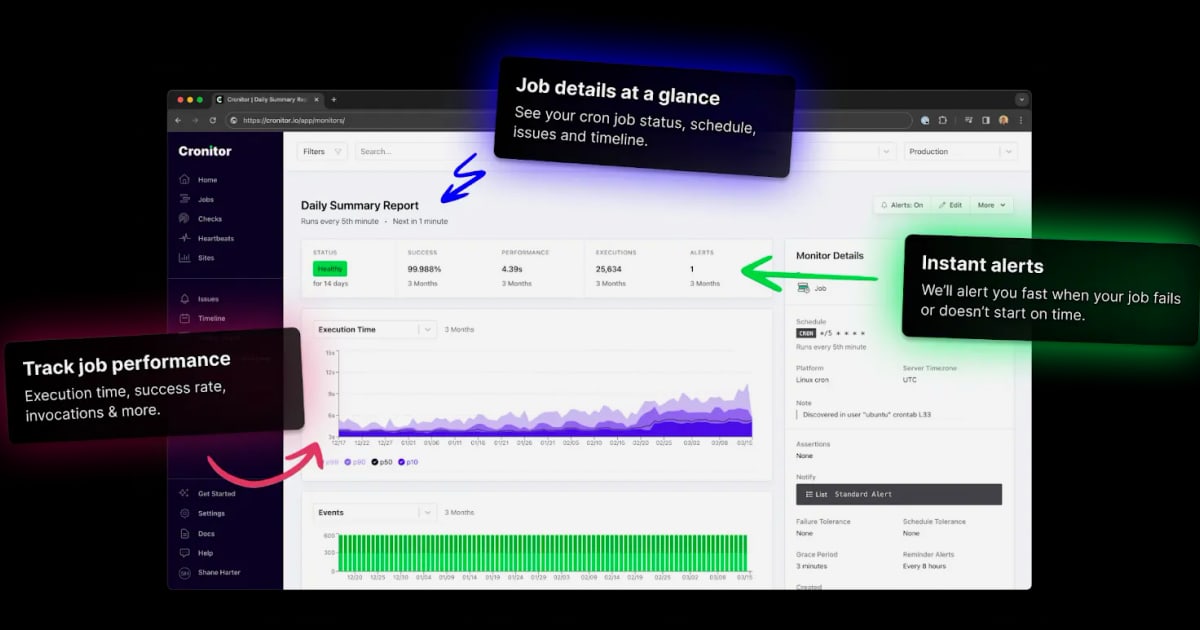
Cronitor Review 2026: Features, Pricing, and Real Tradeoffs
Cronitor is a developer-focused monitoring platform that watches the things that quietly break in production: cron jobs that never fire, APIs that slow to a crawl, and background workers that die without a stack trace. This review breaks down what it does well, where it falls short, how pricing actually works, and which teams should consider it.
What Cronitor Does
Cronitor combines several monitoring primitives into one product rather than selling them as separate tools:
- Job and scheduled agent monitoring — checks whether cron jobs and scheduled agents run on the configured schedule, and alerts when they don't.
- Synthetic uptime and performance checks — monitors websites and APIs for availability, latency, and SSL health against thresholds you define.
- Heartbeat monitoring — accepts a heartbeat from any source that can send an HTTP request, useful for custom pipelines and non-standard workloads.
- Status pages — public or private pages that communicate current system state to customers or internal stakeholders.
- Website analytics — traffic, error, and performance data for the sites you monitor.
The product is positioned as "monitoring made for developers," and the utility-knife framing is accurate: it is less about deep APM tracing and more about catching the operational failures that traditional application monitoring often misses.
Who Cronitor Is For
Cronitor fits teams that already run scheduled and background work and want fast, low-friction visibility into it.
Ideal users include:
- Solo developers and small startups running cron jobs on a single VPS or a handful of containers.
- Platform and infrastructure teams managing scheduled agents across on-prem and cloud environments.
- Engineering teams that need uptime and job monitoring in one place instead of stitching together three vendors.
- Organizations that want status pages without adopting a heavier incident management suite.
Less ideal for:
- Teams that need full distributed tracing, log aggregation, or deep application performance profiling.
- Enterprises looking for a single vendor to cover observability across logs, metrics, traces, and incidents.
- Non-technical users who want a point-and-click website monitor with no code or configuration.
Strengths
Fast setup for job monitoring
Cronitor's core workflow is straightforward: create a monitor, get a unique ping URL, and have your job call that URL on success or failure. There is no agent to install for basic heartbeat-style monitoring, which keeps the barrier to entry low.
Broad alerting reach
Alerts can be delivered through email, Slack, Microsoft Teams, Discord, and webhooks. For teams that live in chat, this reduces the friction of responding to failures.
Developer-friendly integrations
Cronitor provides SDKs for most common languages and platforms, a REST API, an MCP server for coding agents, and extensive documentation. That matters if you want monitoring to be part of your deployment pipeline rather than a separate dashboard you check manually.
Scale and reliability signals
Cronitor reports handling over 100 million events per day, 10 million checks per day, 100,000 jobs per day, and 10,000 alerts per day, with 99.997% uptime over the last 12 months. It serves over 100,000 developers, from one-person startups to Fortune 500 infrastructure, with customers including Disney, GOV.UK, Monzo, and monday.com.
Transparent, usage-based pricing
Pricing starts free with 5 monitors, then moves to $2 per monitor per month plus $5 per user per month. There is a 14-day free trial, no minimums, and a 60-day money-back guarantee. That structure is predictable for small teams and scales linearly as you add monitors.
Limitations and Tradeoffs
Not a full observability platform
Cronitor is not a replacement for APM, log management, or distributed tracing. If your incident response depends on correlating traces across microservices, you will still need another tool.
Pricing scales with monitors and users
The per-monitor and per-user model is fair for small teams, but costs can add up if you monitor hundreds of endpoints or add many viewers. Teams with large fleets should model the cost before committing.
Learning curve for advanced checks
Basic heartbeat monitoring is easy, but configuring budgets for uptime, latency, and SSL thresholds, or building custom checks via the API, requires more time and familiarity with the platform.
Limited public review depth
Public review coverage is thinner than for larger observability vendors. Sources like Capterra, G2, and Product Hunt offer useful signals, but the volume of detailed, long-term reviews is smaller than you would find for some competitors.
Pricing Signals
Cronitor's pricing model is simple on the surface:
| Component | Cost |
|---|---|
| Free tier | 5 monitors |
| Paid monitors | $2 per monitor per month |
| Users | $5 per user per month |
| Trial | 14 days free |
| Minimums | None |
| Guarantee | 60-day money-back |
For a small team with 10 monitors and 3 users, that works out to roughly $35 per month. For a larger team with 100 monitors and 10 users, it approaches $250 per month. The key decision is whether you treat monitors as a scarce resource or as a cheap way to cover every critical job and endpoint.
Setup and Getting Started
A typical Cronitor setup follows this path:
- Create an account and pick the monitors you need — job, check, or heartbeat.
- Instrument your workload. For cron jobs, add a curl call to the ping URL at the end of the script. For custom pipelines, send a heartbeat from your code using an SDK or the REST API.
- Configure alerting. Choose email, Slack, Teams, Discord, or a webhook, and set who gets notified.
- Define thresholds. For uptime, latency, and SSL checks, set budgets that reflect acceptable performance.
- Publish a status page if you need to communicate state externally or internally.
- Review analytics to spot traffic, error, and performance trends over time.
If you are already running browser automation or data pipelines, the same instrumentation pattern applies: send a heartbeat when the job completes, and let Cronitor alert you when it doesn't. For teams building crawling or automation infrastructure, the monitoring layer is often the difference between silent failure and a fast fix — see our guide to how web crawlers work for context on where those pipelines tend to break.
How Cronitor Compares
Cronitor sits in a crowded monitoring market. Here is how it tends to compare:
- Versus dedicated cron monitoring tools: Cronitor offers more surface area — uptime checks, status pages, and analytics — without forcing you to buy separate products.
- Versus full observability platforms: Cronitor is lighter and faster to adopt, but lacks deep tracing and log analysis.
- Versus simple uptime monitors: Cronitor's job and heartbeat monitoring is the differentiator; simple uptime tools rarely cover scheduled work well.
- Versus browser automation and scraping stacks: Cronitor is complementary. Tools like AdsCrawl handle the automation; Cronitor watches whether the automation actually ran.
For teams evaluating broader infrastructure choices, our cloud developer platform ranking provides additional context on where monitoring fits in a modern stack.
Decision Criteria
Ask these questions before choosing Cronitor:
- Do you run scheduled or background jobs? If yes, Cronitor's job monitoring is likely the strongest reason to adopt it.
- Do you need uptime and job monitoring in one tool? If so, Cronitor reduces vendor sprawl.
- How many monitors and users will you need? Model the per-monitor and per-user cost against your expected growth.
- Do you need deep tracing or log analysis? If yes, plan for a complementary observability tool.
- How fast do you need alerts? Cronitor's multi-channel alerting is a strong fit for chat-based incident response.
- Do you want a status page? If yes, Cronitor covers that without a separate subscription.
Related reading
- How to Use AdsCrawl with OpenWeb Ninja: Browser + Data API - Combine AdsCrawl browser automation with OpenWeb Ninja data APIs. Step-by-step setup, code examples, and a workflow for SERP, e-commerce, and local data.
FAQ
Is Cronitor free?
Cronitor has a free tier that includes 5 monitors. Paid plans start at $2 per monitor per month plus $5 per user per month, with a 14-day free trial and no minimums.
What is Cronitor best at?
Cronitor is strongest at cron job and scheduled agent monitoring, heartbeat monitoring, and synthetic uptime checks. It is particularly useful for catching silent failures in background work.
Does Cronitor replace APM tools?
No. Cronitor is not a full APM or observability platform. It complements APM tools by covering scheduled jobs, uptime, and heartbeat signals that APM tools often miss.
How does Cronitor alert teams?
Alerts can be sent via email, Slack, Microsoft Teams, Discord, and webhooks.
Is Cronitor good for small teams?
Yes. The free tier and low per-monitor pricing make it accessible for solo developers and small teams, and the pricing scales without minimum commitments.
What are the main limitations of Cronitor?
The main limitations are the lack of deep tracing and log analysis, pricing that scales with monitors and users, and a learning curve for advanced threshold and API-based checks.
Conclusion
Cronitor is a focused, developer-friendly monitoring platform that solves a specific and common problem: knowing when scheduled work and critical endpoints fail. Its strengths are fast setup, broad alerting, transparent pricing, and a utility-knife feature set that covers jobs, uptime, heartbeats, status pages, and analytics. Its limitations are equally clear: it is not a full observability suite, and costs grow with monitors and users.
For teams that run cron jobs, background agents, or API-dependent workflows, Cronitor is worth a serious look — especially if you want monitoring that fits into your code and chat tools rather than another dashboard to check. Start with the free tier, instrument your most critical jobs, and let the alerts tell you whether it earns a permanent place in your stack.