
What Is a Web Crawler? How Spiders Work in 2026
Learn how web crawlers work: crawl frontier, robots.txt, politeness, AI crawlers, and how to build reliable crawling pipelines with browser APIs.
What Is a Web Crawler? How Spiders Work in 2026
A web crawler is a bot that discovers and downloads web pages by following links, one URL at a time. Search engines run them to build indexes, AI companies run them to gather training and retrieval data, and developers run them to monitor prices, track competitors, and feed data pipelines. This guide explains how crawlers actually work — the frontier, the policies, the limits — and how modern teams build crawlers that survive JavaScript-heavy sites and anti-bot defenses.
Web crawler vs. web spider vs. web scraping bot
The terms overlap, but they describe different jobs:
- Web crawler / spider / spiderbot: a bot that systematically browses the web, starting from seed URLs and following hyperlinks to discover new pages. Its output is usually a list of URLs and downloaded content.
- Search engine crawler: a crawler operated by Google, Bing, or another search provider. It feeds an index so users can search. Googlebot is the best-known example.
- AI crawler: a crawler that collects content to train large language models or to retrieve live information for AI assistants. AI crawling activity now exceeds traditional search crawling on many sites.
- Web scraping bot: a program that extracts specific data — prices, listings, reviews — from pages. Scrapers often use a crawler to find the pages first, then parse them.
In practice, a production pipeline usually combines all four: crawl to discover, render to execute JavaScript, extract structured fields, and schedule revisits.
How a web crawler works: seeds, frontier, and recursion
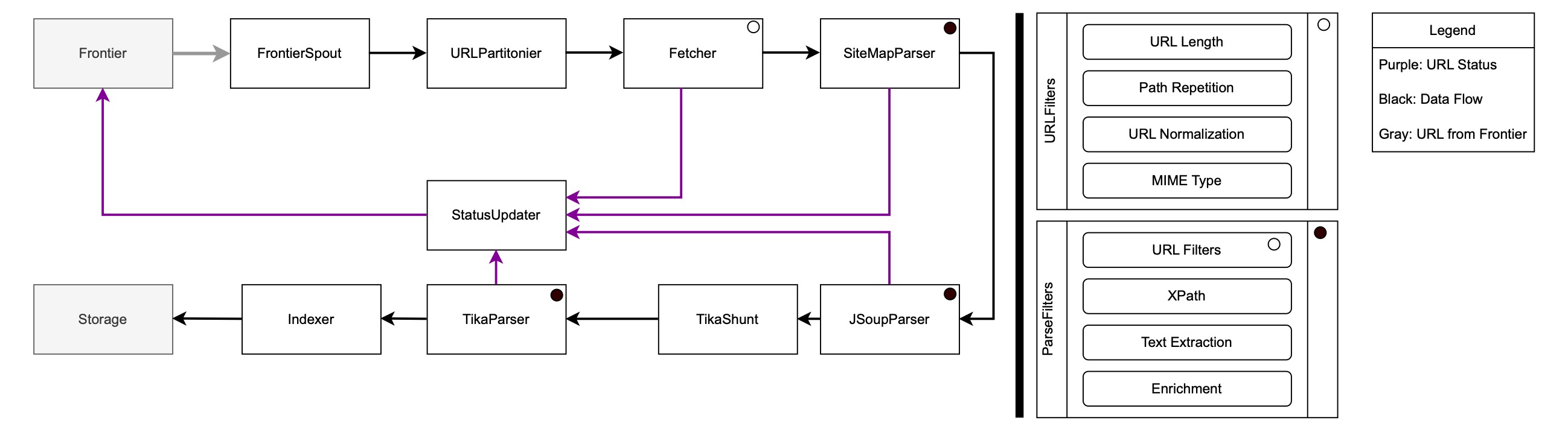
What Is a Web Crawler? How Spiders Work in 2026 - How a web crawler works: seeds, frontier, and recursion.
Every crawler follows the same basic loop:
- Seed list: start with a set of known URLs. Seeds can come from a sitemap, a previous crawl, or a manual list.
- Fetch: request each URL from its web server and download the response.
- Parse: extract all hyperlinks from the downloaded HTML.
- Frontier: add the newly discovered URLs to a queue called the crawl frontier.
- Recurse: visit URLs from the frontier according to a priority policy, and repeat.
If the crawler is archiving sites, it saves each response as a snapshot so the page can be replayed later. The frontier is where most engineering effort goes, because the web is effectively infinite: crawlers generate far more URLs than they can ever download.
Why duplicate URLs break naive crawlers
URL parameters multiply content. A photo gallery with four sort options, three thumbnail sizes, two file formats, and a content toggle can expose the same images through 48 different URLs. A crawler that treats each URL as unique wastes bandwidth on duplicates. Canonicalization — stripping tracking parameters, normalizing case, resolving redirects — is a required step, not an optimization.
Crawler policies: selection, revisit, politeness, parallelization
A crawler's behavior is the combined result of four policies:
- Selection policy: which pages to download next. Common strategies include breadth-first, backlink count, partial PageRank, and OPIC (On-line Page Importance Computation). Research on domain crawls found that partial PageRank tends to surface high-value pages early, while breadth-first is simple and surprisingly effective at scale.
- Revisit policy: how often to check pages for changes. News sites may need hourly revisits; documentation may need monthly.
- Politeness policy: how to avoid overloading servers. This includes respecting
robots.txt, rate limiting per host, and honoringCrawl-delaydirectives. - Parallelization policy: how to coordinate distributed crawlers so they don't duplicate work or hammer the same host.
robots.txt and the limits of voluntary compliance
Before crawling a page, well-behaved crawlers check the site's robots.txt file, which lists allowed and disallowed paths and sometimes crawl delays. The catch: robots.txt is voluntary. Not all crawlers obey it, and site owners increasingly use bot management to block non-compliant traffic at the edge. If you operate a crawler, respect robots.txt and identify your bot with a clear user agent — it reduces the chance of being blocked and keeps your pipeline stable.
Crawling modern JavaScript sites
What Is a Web Crawler? How Spiders Work in 2026 - Crawling modern JavaScript sites.
The classic crawler fetches HTML and parses links. That model breaks on single-page applications, infinite scroll, and content loaded via API calls after the initial response. To crawl these sites, you need a real browser that executes JavaScript and waits for the DOM to settle.
Options include:
- Headless browser frameworks like Puppeteer and Playwright, which give you full control but require you to manage browsers, concurrency, and infrastructure.
- Cloud browser APIs that expose remote Chrome sessions over a unified API. AdsCrawl, for example, provides browser automation and data extraction endpoints that capture screenshots, return HTML or Markdown, and let you drive remote Chrome DevTools Protocol (CDP) sessions — useful when you need to validate that a page rendered correctly before extracting data.
If you are comparing these approaches, the trade-off is usually control versus operational overhead. A self-hosted Playwright setup is flexible but needs scaling, fingerprint management, and retry logic. A managed API handles those concerns but adds a dependency. For a deeper comparison, see AdsCrawl vs Browser Use Cloud vs Puppeteer (2026).
Rendering is not the same as crawling
A renderer executes JavaScript and returns a final DOM. A crawler decides which URLs to visit and in what order. Production systems separate the two: the crawler manages the frontier and scheduling, while the renderer handles individual page loads. This separation lets you swap rendering backends without rewriting crawl logic.
Crawling vs. scraping: where the line sits
Crawling is discovery; scraping is extraction. A crawler answers "what pages exist?" A scraper answers "what is the price on this page?" Most data projects need both, and the handoff point matters.
| Task | Crawler | Scraper |
|---|---|---|
| Discover new URLs | Yes | No |
| Follow links recursively | Yes | Rarely |
| Extract structured fields | Sometimes | Yes |
| Handle pagination | Yes | Sometimes |
| Respect robots.txt | Required | Required |
A practical pattern: crawl to build a URL inventory, then run extraction jobs against that inventory on a schedule. This keeps discovery and parsing independently scalable. If you want to see how browser automation pairs with data APIs for this pattern, How to Use AdsCrawl with OpenWeb Ninja: Browser + Data API walks through a working setup.
AI crawlers and the changing crawl economy
AI crawlers serve three purposes:
- Training data: collecting content to refine large language models.
- Live retrieval: fetching pages so AI assistants can cite current information.
- Indexing: mapping where valuable content lives so retrieval works at query time.
The economics are shifting. Traditional search crawlers send traffic back to sites; AI crawlers often answer questions without a click. That has pushed publishers to tighten robots.txt rules, deploy bot management, and license content. If you run an AI-powered product, expect more friction: more sites will require identification, rate limits, or explicit agreements.
For teams building AI agents that need to browse, the practical answer is browser infrastructure with fingerprint profiles and concurrent sessions. AdsCrawl's cloud browser sessions and credit-based usage model are designed for exactly this: repeatable web actions wrapped into reliable APIs rather than one-off scripts.
How to build a reliable crawler pipeline
A production crawl pipeline has five stages:
- Seed and schedule: define entry points and revisit frequency per domain.
- Fetch: request pages with retries, timeouts, and per-host rate limits.
- Render: execute JavaScript when the initial HTML is incomplete.
- Extract: parse structured data and store it with the source URL and timestamp.
- Validate: check that pages rendered correctly and that extracted fields are non-empty.
Validation is the stage most teams skip. A crawler that silently returns empty price fields is worse than one that fails loudly. Screenshot capture and DOM snapshots are cheap ways to verify rendering state before you trust the data.
Choosing your crawling stack
- Small, static sites: a simple HTTP client plus an HTML parser is enough.
- JavaScript-heavy sites: headless browsers or a cloud browser API.
- Large-scale, multi-domain crawls: distributed frontier with per-host queues and a rendering service.
- AI agent workflows: browser sessions with CDP access and concurrent execution.
If you are evaluating platforms for the infrastructure layer, Top 10 Cloud Developer Platform & Edge Infrastructure 2026 compares the options by capability and cost. And if your use case is price monitoring specifically, How to Use AdsCrawl with Price2Spy for Price Monitoring shows how to combine browser automation with a monitoring platform.
Related reading
- AdsCrawl vs Data Miner: Which Web Scraping Tool Wins in 2026? - Compare AdsCrawl and Data Miner for web scraping. See how a browser automation API outperforms a browser extension for scale, control, and AI workflows.
Sources and further reading
- WebCrawler Search - Web; Images · Videos · News · Infospace Holdings LLC, A System1 Company · Terms ... © WebCrawler 2026. All Rights Reserved.
- Web crawler - This article is about the Internet bot. For the search engine, see WebCrawler. "Web spider" redirects here; not to be confused with Spider web. "Spiderbot" redirects here; not to be confused with Spiderbot (video game).
- What Is a Web Crawler? | How Web Spiders Work - Web crawler bots (i.e. web spider bots) index web content for search results. Learn how Google crawlers operate and how bot management should handle these bots.
FAQ
What is a web crawler in simple terms?
A web crawler is a bot that visits web pages, reads their links, and follows those links to find more pages. Search engines use crawlers to build their indexes.
Is a web crawler the same as a web spider?
Yes. "Web crawler," "spider," and "spiderbot" refer to the same thing. The term "spider" comes from the way the bot crawls across the web of linked pages.
Do web crawlers obey robots.txt?
Well-behaved crawlers do. robots.txt is a voluntary standard, so compliance depends on the operator. Search engines generally follow it; some scrapers do not.
How much of the web do search engines actually crawl?
Studies have estimated that major search engines index only a fraction of the publicly available web — often cited as 40–70% of indexable pages. No crawler covers everything.
Can a crawler handle JavaScript-rendered pages?
Only if it uses a real browser engine. Plain HTTP clients see the initial HTML, not content injected by JavaScript. Headless browsers and cloud browser APIs solve this.
What is the difference between crawling and scraping?
Crawling discovers URLs by following links. Scraping extracts specific data from pages. Most data pipelines use both.
Conclusion
A web crawler is simple in concept — fetch, parse, follow links — and hard in practice. The frontier, duplicate URLs, politeness rules, JavaScript rendering, and AI-era bot management all add complexity. The teams that succeed treat crawling as infrastructure: separate discovery from extraction, validate rendering before trusting data, and respect the sites they crawl. Whether you build on open-source frameworks or a managed browser API, the principles stay the same.