
Playwright Similar Tools: 9 Alternatives Compared for 2026
Compare Playwright alternatives like Selenium, Puppeteer, Cypress, and cloud browser APIs. Find the right fit for testing, scraping, and AI agent workflows.
Playwright Similar Tools: 9 Alternatives Compared for 2026
Playwright became a default choice for browser automation because it handles modern web apps well: auto-waiting, cross-browser coverage, tracing, and a solid developer experience. But "default" is not the same as "best for every team." Some teams hit maintenance ceilings, some need Chrome-only scraping at scale, and some need a browser that runs in the cloud without local installs.
This guide compares nine tools that are similar to Playwright or replace it in specific workflows. It covers what each one does well, where it falls short, and how to choose based on your actual job: end-to-end testing, data extraction, or AI agent automation.
Why Teams Look Beyond Playwright
Playwright Similar Tools: 9 Alternatives Compared for 2026 - Why Teams Look Beyond Playwright.
Playwright is not failing. Teams usually leave it for one of four reasons:
- Maintenance load. Complex flows with state, network mocking, and dynamic selectors still require deep framework knowledge and ongoing test upkeep.
- Resource cost at scale. Running many parallel browser instances locally gets expensive in CPU and memory.
- Not truly codeless. Codegen helps you start, but you still own and maintain the code.
- Limited mobile app coverage. Playwright targets web browsers, not native mobile apps.
If your work is mostly testing, the alternatives below lean toward stability and lower maintenance. If your work is scraping, monitoring, or agent-driven browsing, the alternatives lean toward infrastructure and API access.
The 9 Best Playwright Similar Tools in 2026
Playwright Similar Tools: 9 Alternatives Compared for 2026 - The 9 Best Playwright Similar Tools in 2026.
1. Selenium: Best for Multi-Language and Legacy Coverage
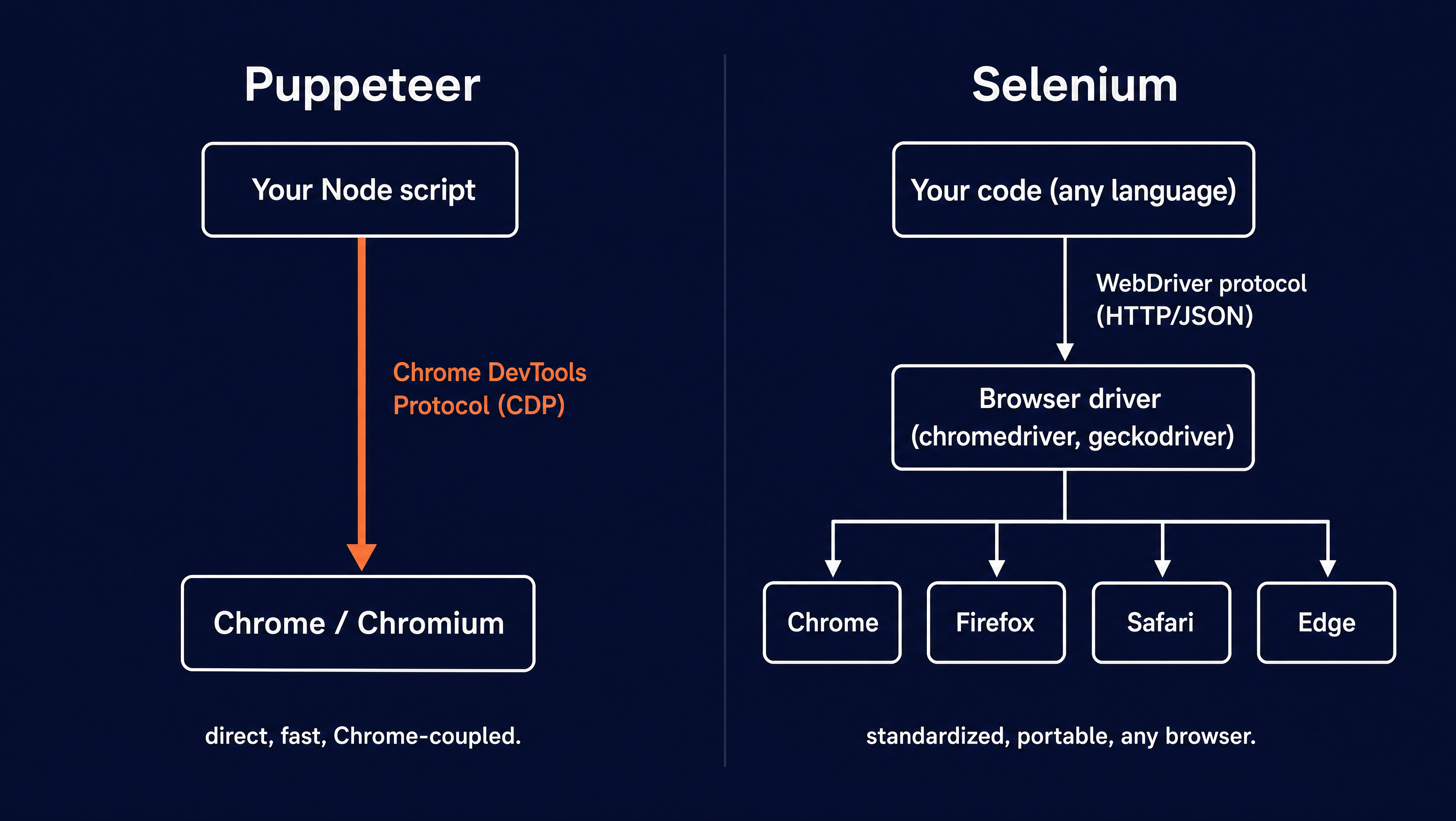
Selenium is the oldest and most widely adopted browser automation standard. It uses the WebDriver protocol, an open standard, which means you can drive it from Java, Python, C#, Ruby, JavaScript, and more.
Strengths:
- Broadest language and browser support, including older browsers and mobile via Appium
- Large ecosystem of grid and cloud scaling options
- Mature, stable, and well documented
Tradeoffs:
- More setup work than Playwright
- Verbose API
- WebDriver is HTTP-based, so capturing network events or console logs is harder than with bidirectional protocols
Choose Selenium when you need one framework across many languages and platforms, or when your organization already has Selenium infrastructure.
2. Puppeteer: Best for Chrome-Only Automation
Puppeteer is a Node.js library maintained by Google that controls Chrome and Firefox through the DevTools Protocol. It is lighter than Playwright and gives direct CDP access when you need it.
Strengths:
- Simple setup, installs a working Chrome version automatically
- Thin wrapper over CDP, so console logs and network events are easy to capture
- Excellent for scraping, PDF generation, and screenshot workflows
Tradeoffs:
- Not a true cross-browser framework
- JavaScript-first, which limits non-Node teams
- Not designed as a full test runner
Puppeteer is the natural pick when your automation is Chrome-centric and you want minimal moving parts. For a deeper comparison of browser API platforms, see AdsCrawl vs Browser Use Cloud.
3. Cypress: Best for JavaScript Teams
Cypress is a developer-first end-to-end testing framework with a strong local workflow and fast feedback loops. It is popular for frontend testing because the debugging experience is smooth.
Strengths:
- Great documentation and community
- Fast, interactive test runner
- Good fit for JavaScript-heavy frontend teams
Tradeoffs:
- Primarily JavaScript-based
- Limited cross-browser coverage compared to Playwright
- Historically weaker on multi-tab and multi-frame scenarios
If your team lives in JavaScript and your app is a single-page frontend, Cypress is a reasonable Playwright alternative for testing.
4. Momentic: Best for AI-Native Test Creation
Momentic is an AI-native testing platform that lets teams write tests in plain English and resolves elements from descriptions at runtime instead of selectors. It targets the maintenance problem directly with self-healing.
Strengths:
- Plain-English test authoring
- Self-healing when the DOM changes
- Cloud, local, and CI/CD execution
Tradeoffs:
- SaaS pricing model
- Less control than code-first frameworks for unusual edge cases
Momentic fits teams that want to reduce QA bottlenecks without hiring more engineers.
5. testRigor: Best for Customer Journey Testing
testRigor is a codeless testing tool that covers web flows end-to-end, including APIs and emails. Tests are written from a user viewpoint rather than from fragile locators.
Strengths:
- Codeless test creation
- Covers full customer journeys, not just UI clicks
- Non-developers can contribute
Tradeoffs:
- Less flexible for highly technical edge cases
- SaaS dependency
6. Functionize: Best for Enterprise Scale
Functionize combines natural language test creation with self-healing and maintenance tooling designed for large, fast-changing applications.
Strengths:
- Enterprise-grade reporting and support
- NLP-based test creation
- Self-healing at scale
Tradeoffs:
- Higher cost
- Heavier platform than small teams need
7. Katalon Studio: Best for Mixed Technical Teams
Katalon Studio blends low-code workflows with scripting flexibility. It supports web, API, and optionally mobile testing in one place.
Strengths:
- Low-code plus scripting
- One platform for multiple test types
- Freemium entry point
Tradeoffs:
- Partial self-healing
- Commercial licensing for advanced features
8. mabl: Best for CI/CD Continuous Testing
mabl is a SaaS testing platform built to run continuously in CI/CD pipelines with analytics and integrations. Its AI-driven healing reduces maintenance when the UI changes between releases.
Strengths:
- Strong CI/CD integration
- Auto-healing
- Built-in analytics
Tradeoffs:
- SaaS-only
- Less suited to scraping or non-testing automation
9. AdsCrawl: Best for Cloud Browser Infrastructure and Data Extraction
AdsCrawl is a browser automation and data extraction API platform. Instead of running browsers on your own machines, you call a unified API to capture screenshots, extract HTML and Markdown, and control remote Chrome DevTools Protocol (CDP) sessions.
Strengths:
- Cloud browser sessions with fingerprint profiles
- Concurrent browser execution for scale
- Screenshot, HTML, and Markdown extraction through one API
- Remote CDP control for custom automation logic
- Credit-based usage with a freemium model
- Dashboards for key management, usage tracking, and debugging
- Quick integration via cURL, Node.js, and Python examples
Tradeoffs:
- Not a test runner or assertion framework
- Best suited to data collection, monitoring, and agent workflows rather than QA suites
AdsCrawl fits teams that need browser infrastructure for the AI era: collecting public web pages at scale, validating page rendering states, and wrapping repeatable web actions into reliable APIs. If your use case is price monitoring on dynamic pages, the AdsCrawl and Price2Spy workflow shows how the two fit together.
Comparison Table
Playwright Similar Tools: 9 Alternatives Compared for 2026 - Comparison Table.
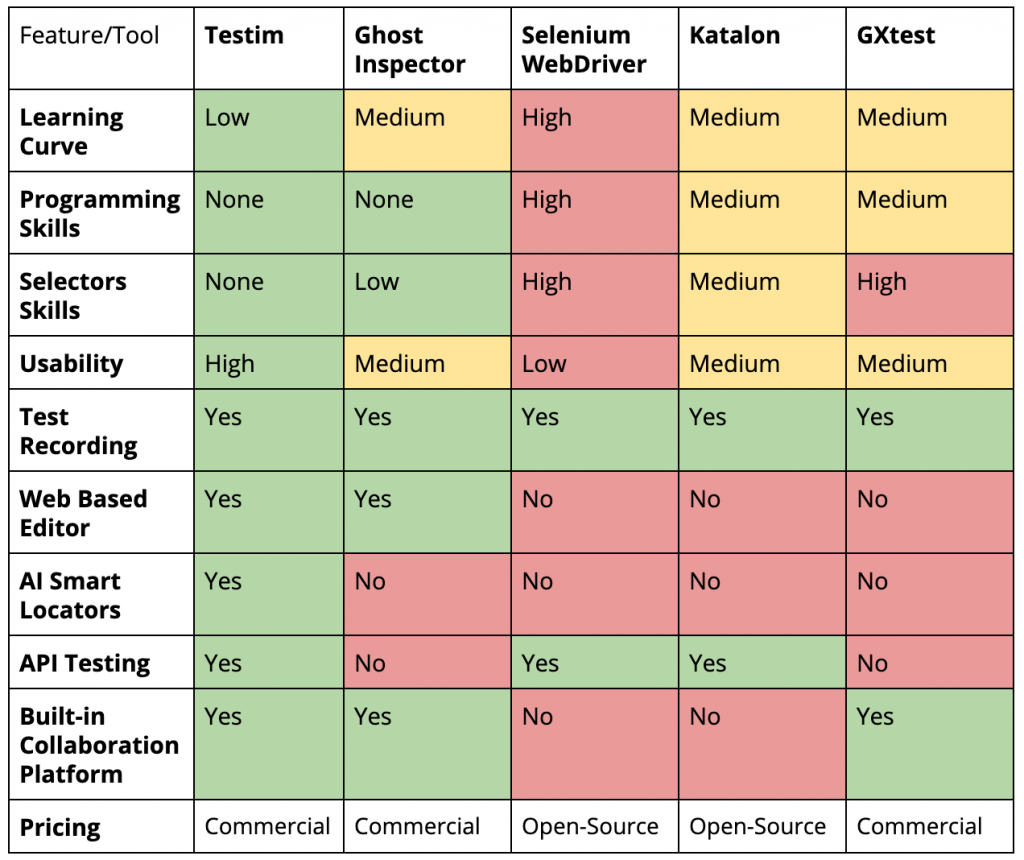
| Tool | Best For | Type | Language | Self-Healing |
|---|---|---|---|---|
| Selenium | Multi-language automation | Open source | Many | No |
| Puppeteer | Chrome automation | Open source | JavaScript | No |
| Cypress | JavaScript E2E testing | Open source + paid | JavaScript | No |
| Momentic | AI-native testing | SaaS | Plain English | Yes |
| testRigor | Customer journeys | SaaS | Plain English | Yes |
| Functionize | Enterprise scale | SaaS | NLP | Yes |
| Katalon Studio | Mixed teams | Commercial (freemium) | Low-code + script | Partial |
| mabl | CI/CD testing | SaaS | Mostly plain English | Yes |
| AdsCrawl | Cloud browser + data extraction | API platform (freemium) | cURL, Node.js, Python | N/A |
How to Choose the Right Playwright Alternative
Playwright Similar Tools: 9 Alternatives Compared for 2026 - How to Choose the Right Playwright Alternative.
The right pick depends on three questions:
- What is the job? Testing, scraping, monitoring, or AI agent browsing. Testing tools optimize for assertions and reporting. Scraping and agent tools optimize for reliable page access and data extraction.
- Who writes the automation? Developer-heavy teams often prefer Selenium, Puppeteer, or Cypress. Mixed teams often prefer Momentic, testRigor, or Katalon.
- How much maintenance can you absorb? If flaky tests are draining your team, prioritize self-healing and plain-English authoring. If you need raw control, prioritize CDP access and code-first frameworks.
For a broader view of the infrastructure layer, the top 10 proxy and web scraping platforms ranking covers proxy networks, anti-bot performance, and developer experience.
Practical Examples
Example 1: Chrome-Only Scraping with Puppeteer
const puppeteer = require('puppeteer');

(async () => {
  const browser = await puppeteer.launch();
  const page = await browser.newPage();
  await page.goto('https://example.com');
  const html = await page.content();
  console.log(html);
  await browser.close();
})();
This is the classic Puppeteer pattern: launch, navigate, extract, close. It works well until you need concurrency and fingerprint management across many pages.
Example 2: Cloud Browser Extraction with AdsCrawl
curl -X POST https://api.adscrawl.com/v1/extract \
  -H "Authorization: Bearer $ADSCRAWL_API_KEY" \
  -H "Content-Type: application/json" \
  -d '{"url": "https://example.com", "format": "markdown"}'
The same job moves from local browser management to an API call. You get Markdown or HTML back, and the browser session runs in the cloud with a fingerprint profile. For teams running many concurrent extractions, this removes the infrastructure burden that comes with local Puppeteer or Playwright fleets.
Example 3: Remote CDP Session for Custom Logic
When you need full control, AdsCrawl exposes remote Chrome DevTools Protocol sessions. You can attach your own automation logic to a cloud browser instead of maintaining local Chrome installations. This is useful for AI agents that need to inspect page state, click through flows, and capture rendered output without owning the browser runtime.
Playwright vs Cloud Browser APIs: When Each Wins
Playwright wins when:
- You need a full test runner with assertions and reporting
- Your team is comfortable writing and maintaining test code
- You want cross-browser coverage in CI
Cloud browser APIs win when:
- You need to extract data from many pages concurrently
- You want to avoid managing browser binaries, drivers, and fingerprints
- Your automation is driven by AI agents, monitoring jobs, or data pipelines
- You want to wrap repeatable web actions into a stable API
Many teams use both. Playwright handles the test suite. A cloud browser API handles the data collection and agent workflows. The AdsCrawl vs Thunderbit vs Screenshotlayer comparison breaks down how the API layer differs across providers.
Related reading
- Top 10 SEO Data API Platforms 2026: Ranked & Reviewed - Compare the top 10 SEO data API platforms of 2026 by data coverage, AI search tracking, pricing, and developer experience. Evidence-based rankings.
Sources and further reading
- Looking for a playwright alternative with less maintenance overhead ... - Mar 23, 2026 ... I get the hassle with maintaining Playwright. If you're looking for something simpler, try Cypress. It's popular for frontend testing and is ...
- Puppeteer, Selenium, Playwright, Cypress - how to choose? - At Testim, a lot of what we do is build AI-based features on top of automation frameworks to add stability, accelerate test creation, and improve root-cause analysis. We evaluate a number of test automation frameworks to understand their strengths and weaknesses, feature differences, and non-functional attributes. As a new
- The 8 Best Playwright Alternatives for 2026 - Explore the best Playwright alternatives for faster, more stable test automation. Compare tools like Cypress, Selenium, and AI-native platforms to reduce maintenance and scale coverage.
FAQ
What is the closest alternative to Playwright?
Puppeteer is the closest in architecture and developer experience, especially for Chrome automation. Selenium is the closest in scope if you need multi-language support. For testing specifically, Cypress and Momentic are common alternatives.
Is Puppeteer better than Playwright?
Not universally. Puppeteer is lighter and gives direct CDP access, which is great for scraping and Chrome-only workflows. Playwright offers cross-browser support, a test runner, and better tooling for testing. The right choice depends on whether you need a test framework or a browser control library.
Can I use Playwright for web scraping instead of testing?
Yes. Playwright can scrape pages, but it is designed primarily for testing. For large-scale scraping, cloud browser APIs and dedicated scraping platforms often reduce infrastructure overhead.
What is the best Playwright alternative for AI agents?
Cloud browser APIs like AdsCrawl are built for this use case. They provide remote CDP sessions, concurrent execution, and extraction endpoints that agents can call without managing local browsers.
Do I need to replace Playwright to use a cloud browser API?
No. Many teams keep Playwright for testing and add a cloud browser API for data extraction, monitoring, and agent workflows. The two serve different layers of the stack.
Conclusion
Playwright remains a strong framework, and for many testing teams it is still the right answer. The question is not whether Playwright is good, but whether it matches your job. If you need cross-browser test coverage with code-first control, keep it. If you need lower maintenance, look at AI-native testing platforms. If you need cloud browser infrastructure for scraping, monitoring, or AI agents, look at API platforms like AdsCrawl.
Start by naming the job, then pick the tool that removes the most friction from that job. That is the only comparison that matters.